
Do you know you can check your BVN without a phone number in Nigeria? Discover simple, free methods using mobile banking apps, step-by-step instructions.
Are you trying to check your Bank Verification Number (BVN) but no longer have access to your registered phone number?
You’re not alone. Many Nigerians face this issue after losing a SIM card or switching phone numbers. Fortunately, there are reliable ways to check your BVN without dialing a USSD code.
In this guide, you’ll learn how to check your BVN without a phone number, using simple, secure, and cost-free methods.
What Is a BVN?
The Bank Verification Number (BVN) is an 11-digit unique identifier issued to every bank customer in Nigeria.
It was introduced by the Central Bank of Nigeria (CBN) to:
- Strengthen banking security
- Prevent fraud and identity theft
- Ensure proper customer identification (KYC)
- Link all bank accounts under one identity
Can You Check BVN Without a Phone Number?
Yes, you can check your BVN without the registered phone number.
While the common method involves dialing *565*0#, you can also access your BVN through your mobile banking app or internet banking platform.
This method is:
- Free
- Secure
- Easy to use
How to Check BVN Without Phone Number (Step-by-Step Guide)
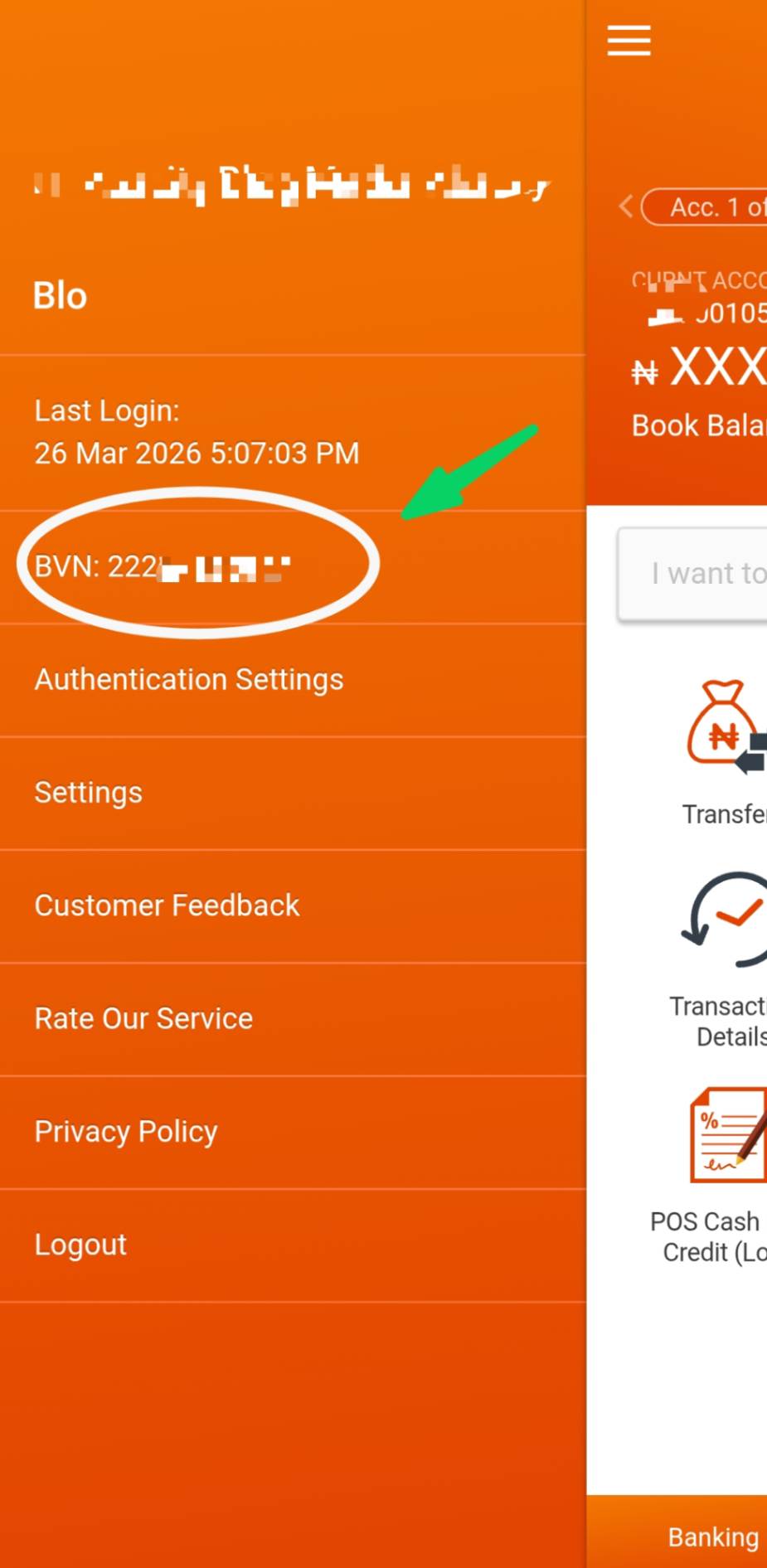
Method 1: Using Your Mobile Banking App
This is the easiest and most recommended method.
Steps:
- Open your bank’s mobile app
- Log in using your username/password or biometrics
- Navigate to Profile, Account Settings, or Dashboard
- Locate your BVN (usually displayed in your personal details)
Example: GTBank App (GTWorld / GAPS Lite)
If you use GTBank:
- Log in to the app
- Tap the menu icon (three dots or lines)
- Select Profile/Settings
- Your BVN will appear on the screen
Method 2: Internet Banking (Without Phone Number)
You can also check your BVN via your bank’s website.
Steps:
- Visit your bank’s official website
- Log in to internet banking
- Go to your profile or account details
- View your BVN
Alternative Method: USSD Code (Requires Registered Number)
If you still have access to your registered SIM, you can use:
- Dial: *565*0#
- Works on all networks (MTN, Airtel, Glo, 9mobile)
- Costs ₦6 per request
Pros and Cons of Checking BVN Without Phone Number
Pros
- Completely free
- Fast and convenient
- No need for registered SIM
- Accessible anytime with internet
Cons
- Requires mobile data or Wi-Fi
- Requires login access to your bank app
- Not helpful if you’ve lost your banking credentials
Best Practices for BVN Security
To protect your financial identity:
- Never share your BVN publicly
- Avoid using untrusted websites
- Always use official banking apps
- Enable security features (PIN, fingerprint, Face ID)
Frequently Asked Questions (FAQs)
1. How can I check my BVN if I lost my phone number?
You can check it through your bank’s mobile app or internet banking platform.
2. Is it free to check BVN via mobile app?
Yes. It is completely free, aside from your internet data usage.
3. Can I retrieve my BVN without logging into my bank account?
No. For security reasons, you must log in to access your BVN.
4. What if I forgot my banking app login details?
You can reset your password via the app or contact your bank’s customer care.
5. Is *565*0# the same for all networks?
Yes, but it only works with the phone number linked to your BVN and costs ₦6.
Summary
Checking your BVN without a phone number is easier than most people think. By using your mobile banking app or internet banking, you can access your BVN quickly, securely, and at no cost.
While the USSD method remains useful, especially without internet access, mobile apps offer the most convenient and modern solution.